
📦 Backup & Restore
IMPORTANT
V-Train does not use any servers. All your data lives only on your computer. We do not have copies of your data. This keeps your data private. But it also means you must backup your data! Please backup often.
🔒 Why Backup?
V-Train saves all your data inside your web browser. This includes:
| Data Type | Description |
|---|---|
| 📊 Viewing History | How much of a video you have watched |
| ⚙️ Settings | Colors, language, and switches |
| 🗺️ Training Rules | The rules you made for new websites |
| ❤️ Bookmarks | Your saved videos and folders |
| ⭐ Ratings | The videos you liked or disliked |
| 🖼️ Custom Covers | The pictures you took for video covers |
Your data will be lost forever if you do these things:
⚠️ Common ways to lose data
- 🗑️ Uninstall the V-Train extension
- 🔄 Reset your browser settings
- 💻 Buy a new computer or reinstall your operating system
- 🧹 Clear browser data (Cookies and Cache)
🚀 How to Backup
You can find the backup buttons at the top of the Dashboard.
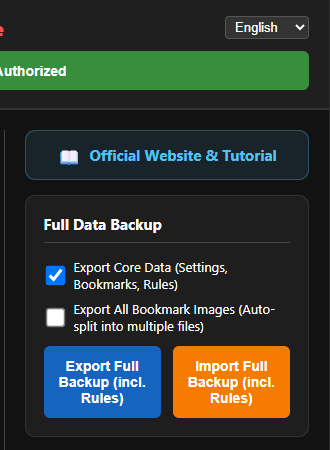
Click the "Export Full Backup" button. A window will open to let you choose what to save.
⬆️ Export Data (Save a Backup)
Choose What to Backup
You can choose to save one or both of these things:
📋 Core Data
This includes: viewing history, rules, bookmarks, ratings, and settings. This file is very small. You should back this up every time you train a new website.
🖼️ Image Covers
This includes: the pictures you took for your video covers. Warning: If you have many pictures, this file will be very big. The backup will take more time.
The Backup Process
After you click export, a new page will open. It does everything automatically. You just need to wait:
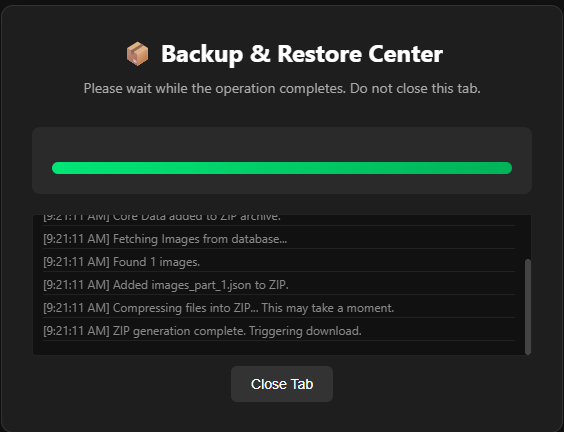
- Initializing: Getting ready.
- Fetching Core Data: Reading your history and bookmarks.
- Packaging Images: Packing your cover pictures.
- Compressing ZIP: Making the file smaller.
- Download Complete: The file downloads to your computer. The name is
VTrain_Backup_YYYY-MM-DD.zip.
💡 Have thousands of pictures?
V-Train can handle very large backups! It will split your pictures into smaller files so your computer does not crash.
Inside the Backup File
If you open the ZIP file, you will see files like this:
VTrain_Backup_2025-01-01.zip
├── core_data.json          # Your history, rules, and settings
├── images_part_1.json      # The first part of your cover pictures
├── images_part_2.json      # The second part of your cover pictures
└── ...
Keep your backup safe
You should save this ZIP file in a safe place. Put it on Google Drive, Dropbox, or a USB drive.
⬇️ Import Data (Restore a Backup)
When do you use this?
- You bought a new computer.
- You accidentally deleted your browser data.
- You want to copy your rules to another computer.
How to Restore
- Open the Dashboard.
- Click the "Import Full Backup" button at the top.
- A new page will open.
- Drag and drop your
.zipbackup file into the page. Or click the button to select the file.
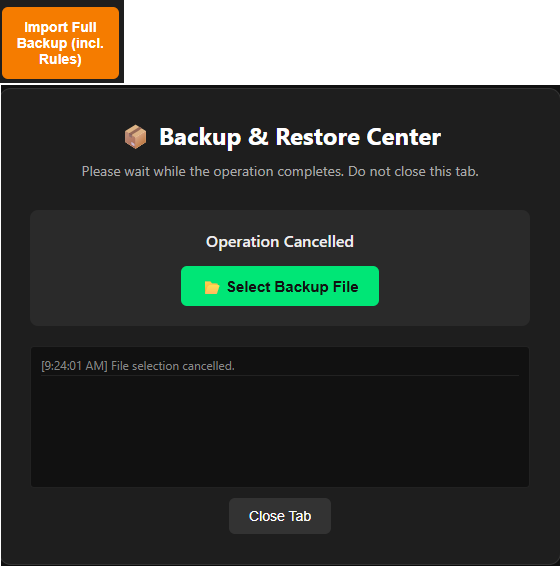
- The system will load your data.
- When it finishes, you can close the page.
💡 Refresh your page
After you restore, you must refresh the video website you are looking at.
Restore Order
If you have separate files, restore core_data.json first. Then restore the picture files.
🔄 Using V-Train on Two Computers
V-Train does not sync your data to the cloud automatically. This keeps your data private. If you want to use the same data on two computers:
- Export a backup on Computer A.
- Move the ZIP file to Computer B (using a USB drive or Google Drive).
- Import the backup on Computer B.
Easy way to share rules
Do you want to share a website rule with a friend? You do not need to make a full backup! Go to the Dashboard → Click "Trained Sites" → Click "Share" to copy the serial number. Give this number to your friend.
📋 When Should I Backup?
| Type of User | How Often to Backup |
|---|---|
| I use it sometimes | Once a month |
| I use it normally | Every two weeks |
| I use it a lot (Many bookmarks) | Once a week |
| I just trained a new website | Backup right now! |
The most important rule
Always backup before you update Windows or macOS! Sometimes system updates delete browser data.