👑 Pro Features Guide
V-Train has a Pro Version. You only pay one time. There are no monthly fees. Pay once, and use it forever! This page explains all the extra features you get with the Pro version.
🆓 Free Version vs Pro Version
| Feature | Free Version | Pro Version |
|---|---|---|
| Track Progress | ✅ Unlimited Sites | ✅ Unlimited Sites |
| Adaptive Engine | ✅ Full Feature | ✅ Full Feature |
| Share Rules | ✅ Full Feature | ✅ Full Feature |
| Backup & Restore | ✅ Full Feature | ✅ Full Feature |
| Video Record Limit | ⚠️ 200 videos | ✅ Unlimited |
| Floating Panel | ✅ | ✅ |
| Bookmark Vault | ✅ Max 100 videos | ✅ Unlimited |
| Custom Covers | ✅ | ✅ |
| Passcode Lock | ❌ | ✅ |
📊 The 200 Video Limit (Free Version)
The Free version of V-Train can remember your progress for 200 videos.
How V-Train Cleans Up Old Data
What happens when you watch your 201st video?
- The system finds the oldest video record you have not watched in a long time.
- It deletes that old record to make space.
- It always keeps your newest 200 videos.
😅 Imagine a small robot that can only remember 200 things. When it learns something new, it must forget something old.
💡 Bookmark Protection
If you save a video to your Bookmark Vault, V-Train will never delete its record. This is because a bookmark means the video is important to you!
Will this limit bother me?
- If you watch a few videos a week, you will not notice the limit.
- If you watch many videos every day, your oldest records will disappear.
- If you want to keep your progress forever, you should upgrade to Pro!
🎯 Pro Version Features
1. Unlimited Video Records
When you upgrade to Pro, the 200 video limit is removed. The system stops deleting your old records. You can save the progress of thousands of videos. V-Train will remember them all.
2. Floating Panel (Hover Panel)
When you watch a video, a small panel appears on the screen:
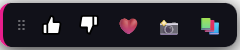
What the buttons do:
| Button | Function |
|---|---|
| 👍 Like | Add a thumbs-up icon to the video picture. |
| 👎 Dislike | Add a thumbs-down icon to the video picture. |
| ❤️ Bookmark | Save the video to a folder. |
| 📸 Screenshot | Take a picture of the video to use as a cover. |
| 📚 Vault | Open your Bookmark Vault. |
Move the panel!
You can click and drag the panel. V-Train will remember where you put it.
Turn off the panel
You can turn off this panel in the Dashboard.
3. Bookmark Vault
A full-screen page to organize your favorite videos. Read more on the Bookmark Vault Guide.
4. Custom Screenshot Covers
Sometimes, website pictures disappear. You can click the 📸 button to take your own picture of the video.
- V-Train takes a picture of the video player.
- The picture is made smaller to save space.
- The picture is saved on your computer.
- Your Bookmark Vault will now use this new picture as the cover.
❌ When does a screenshot fail?
- The website blocks screenshots for security.
- The video is hidden inside another webpage.
- You will see a red ❌ if it fails.
Even if the screenshot fails, you can still save the video to your Bookmark Vault.
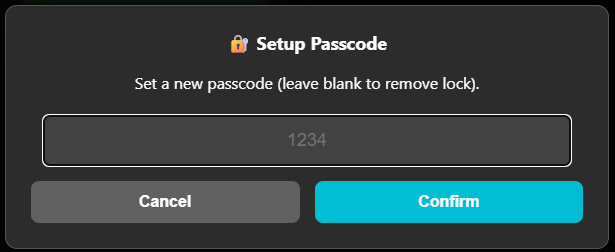
5. Privacy Passcode Lock
The Pro version lets you add a password to V-Train:
- You must type the password to open the Dashboard.
- This stops other people from seeing what videos you watch.
🔑 How to Buy and Enable Pro
- Go to the V-Train Pro Store. (Pay once, no monthly fees).
- After you pay, you will receive a License Key.
- Open the V-Train Dashboard. Find the "⚡ Unlock V-Train Pro" button at the bottom.
- Paste your License Key in the box.
- V-Train will check the key online.
- Success! All Pro features will unlock immediately.
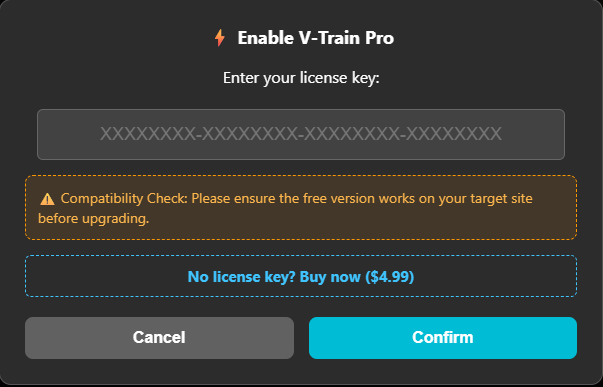
💡 Keep your License Key safe!
You can use your License Key again if you buy a new computer. Save it in a safe place!
🆘 I Forgot My Passcode!
If you forget your password, you can reset it:
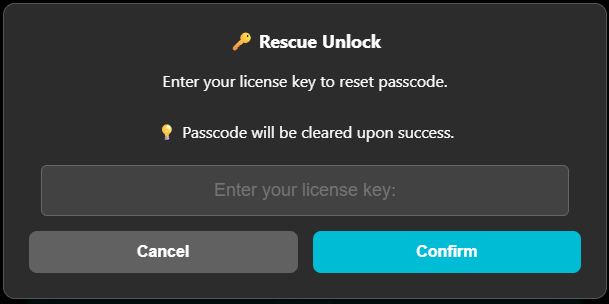
- Click "Forgot Passcode?" on the password screen.
- Enter your Pro License Key.
- Your password will be removed.
- You should create a new password and backup your data.
💀 I forgot my passcode AND lost my License Key
If you lose your License Key, you cannot reset your password. This is to protect your privacy. You must reinstall V-Train (this deletes all your data) and buy Pro again. Please keep your License Key safe!
📞 Support and Links
- 🛒 Buy Pro: V-Train Pro Store
- 💬 Ask for Help: GitHub Issues
- ⭐ Chrome Web Store: Chrome Web Store
Pro License Rules
- Pay once. No monthly fees.
- Valid forever. You get all future updates for free.
- You can use the key again if you reset your browser.